Microbit: easier with extensions
The BBC Microbit is a wonderful introduction to both programming and electronics, but MakeCode’s Blocks make some ideas quite hard to express.
Introducing my 6yo to robotics, I’m conscious how important it is to keep things interesting, to keep difficulties abstracted, hidden. Buzzers, LEDs, motor controllers and servos are pretty much plug-and-play these days but control is harder. You want speed, direction, some buttons for features and ideally some method of feedback.
The builtin BLE allows phone apps, but I try to keep my kids off phones. There isn’t a proper BT stack available to the Microbit, so real controllers are out. IR is super cheap but the experience is short range and very directional. Similarly a corded remote works with caveats. But none are ideal.
Use another Microbit.
The radio module in the Microbit is awesome. Its Nordic nRF5xxxx SoC has a proprietary low-latency communication protocol called Enhanced ShockBurst. Microbit software builds on top of this for a super-simple message exchange format. Pick a channel and just send and receive 32byte messages.
A Microbit on its own does have enough sensors to act as a HCI device: accelerometer for directions, two or three buttons depending on your version, but you still have to add batteries, and tilting isn’t the best interface. In a pinch, sure, but better options exist. I have –and would recommmend– a Joystick v2 Plus. ~£15 buys you a x-y axes, four buttons, buzzer, vibration feedback, battery case and the plus version has handles (which you could 3d print).
If it’s so good, why use extensions?
We have our hardware but how do we take that input and send it to our robot? Elecfreaks’ example would have your controller send named events for both axes, every button. 🤮
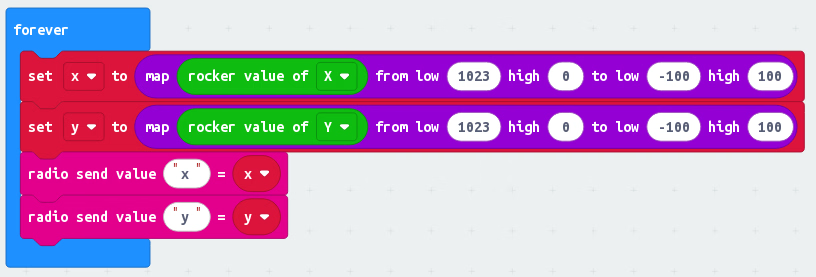
You have to unpick each message separately. These messages are processed in a queue with the main forever loop, it’s possible –likely, even– you’re going to have forever loops where you’re dealing with old data. What about key combinations?
In a real programming language, you’d pack all your data into one packet and send it off and decode it all at once. 8 bits each for x and y. 1 bit per button. In a real language you can use bitwise operators to pack the bits together into a single number, and break them apart just as easily.
    x    |     y    |  c  |  d  |  e  |  f
00000000 | 00000000 |  0  |  0  |  0  |  0
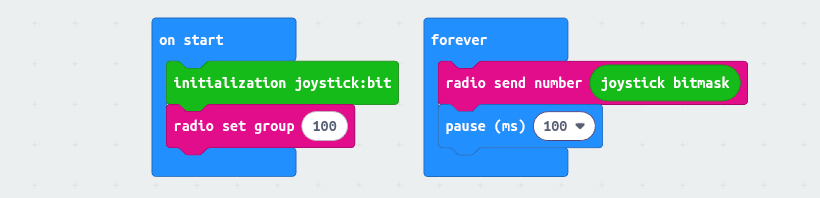
But Blocks lacks the tools for encoding this stuff into a single message … without extensions. So I wrote a joystickbit-radio extension extension to do exactly that. I turns the joypad state into a single number you just transmit over the normal radio block. For the user it’s as simple as dragging a few blocks:
And at the other end, I’ve added some sugar. Not only does it decode, it adds events for button handling, utilities for mapping to different scales, or even tank tracking. It makes the whole endeavour for users much, much easier.
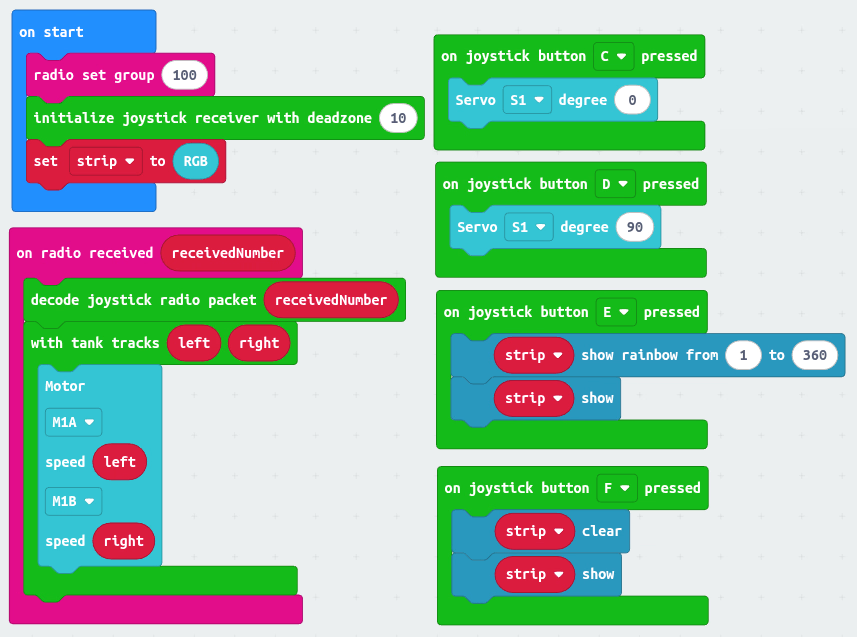
Extensions allow you to create Blocks that do stuff like this. I’m not saying you should use my extension –you can– rather you can write your own! It’s pretty simple and helping your learners before they get stuck will allow them to stay immersed, far longer. Nothing breaks a learning experience like debugging a system you don’t understand, or a impromptu maths lesson on how to unpick a right-to-left axis, or have to learn javascript before they could start.
Blocks is great for discovering the Microbit API, it pays dividends to make it Good Enough™ rather than push people to harder environments.
Things I used: